
Mandarin audio → Chinese text
Chinese Transcription
Chinese transcription turns spoken Mandarin in a local MP3 or WAV file into editable Chinese text. Choose Chinese as the source language, listen beside the result, correct important details, and download the reviewed transcript on this page.
- Chinese selected by default; change it when the recording differs
- Replay audio and correct the text here
- Download reviewed TXT or DOCX
Audio Convert · Mandarin audio
Chinese speech, editable text
Listen to the reference
A short Mandarin interview
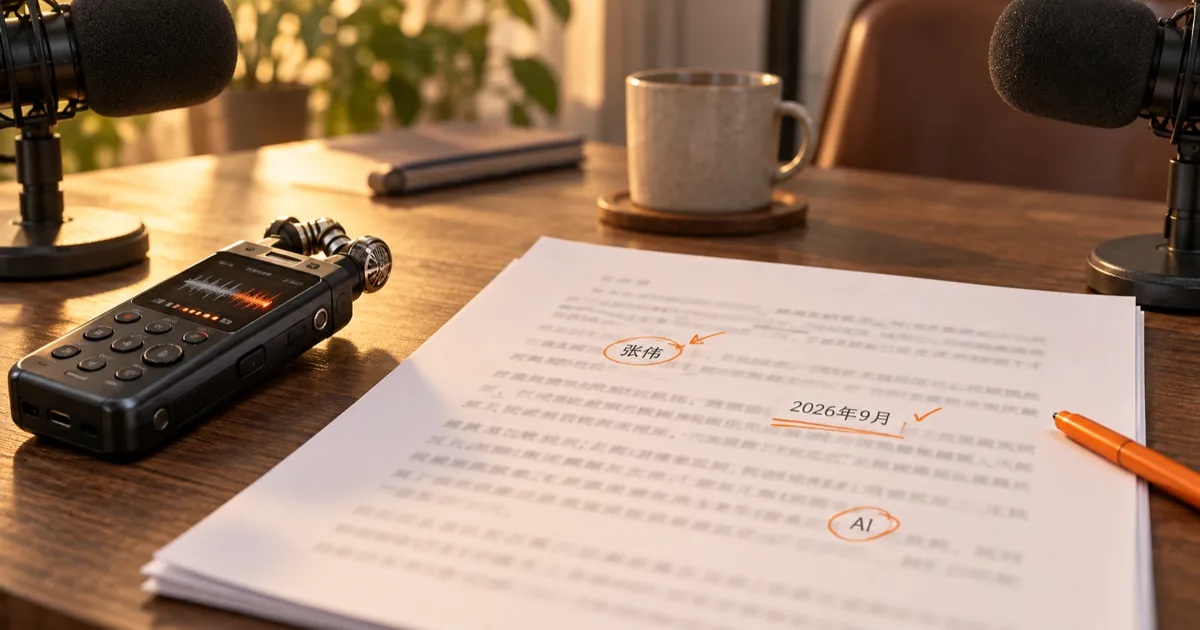
Play the original reference recording, then compare it with the prepared script. Check the names, number, punctuation, and English letters as you listen.
Host: 张伟,你好。请介绍一下今天的项目进度。
Guest: 你好。2026年9月,我们把AI语音笔记测试扩展到3个团队。
Host: 接下来会重点检查什么?
Guest: 先核对人名、数字和中英混合词,再整理成文稿。
How it works
Three steps from source to result
- 01
Choose a local recording
Select an MP3 or WAV up to 95 MiB and 60 minutes. Check its duration and estimated minute credits before starting.
- 02
Set the spoken language
Chinese is preselected. Change the source language if the recording is spoken in another language; your website interface language does not change the audio setting.
- 03
Review and export
Wait for the private task, replay the source, check names and figures, save revisions, and download the current text as TXT or DOCX.
01 · Decision guide
Chinese Transcription from audio
Use this page when the desired output is Chinese writing from a Mandarin recording. The result is an original-language transcript, not pinyin or an English translation. An interview, field note, or spoken update can be reviewed in the same place where it was uploaded.
A local MP3 or WAV is sent through your account's transcription task. The page shows an estimate before submission, then keeps the task in My recordings so you can return to it later.
02 · Decision guide
Review native-language text
Listen to the source while reading the result. In the interview above, check 张伟, 2026年9月, 3个团队, and AI against the audio. Those details matter more than a fluent-looking sentence.
Edit the transcript directly and save it before downloading. If speech is unclear or voices overlap, replay the relevant moment. Clear recording and well-placed microphones generally reduce the amount of correction needed.
03 · Decision guide
Language and export limitations
Chinese is the initial source-language setting, and you may change it. This page does not select a simplified or traditional script, convert between them, promise Cantonese coverage, or translate the transcript. Review the characters and punctuation in the returned text before sharing it.
This page accepts local MP3 and 16-bit PCM WAV audio up to 95 MiB and 60 minutes. WAV must be mono or stereo at 44.1 or 48 kHz. Processing uses your account's available transcription minutes; it is not a local-only operation. TXT saves UTF-8 text and DOCX saves an editable document based on the current saved revision.
Limits to check before you start
A useful tool explains the boundary of the result as clearly as the benefit.
- 01MP3 or 16-bit PCM WAV only; WAV needs 44.1 or 48 kHz mono or stereo audio. Video and pasted links are not accepted.
- 02The spoken-language choice does not set the website interface locale or guarantee a particular Chinese script.
- 03Check names, mixed Chinese-English terms, figures, and punctuation against the recording before export.
- 04Transcription uses account minutes. The current plan and balance determine whether a task can start.
Practical fit
Workflows this page is designed for
Short interviews
Keep the original Mandarin exchange readable while checking speaker turns, names, and dates against playback.
Research notes
Review terminology and mixed-language expressions before moving the text into a report or archive.
Team updates
Correct project names and numeric details in an editable transcript before sharing a document.
Commercial comparison
Audio Convert vs manual transcription vs a desktop tool
Choose Audio Convert when you want a quick first draft and a browser review flow tied to your recordings. Manual transcription suits work where every word must be chosen by a person from the start. A desktop tool can suit an established offline workflow when its actual features and formats meet your needs.
Swipe to compare all 3 products →
| Decision | Audio Convert | Manual transcription | Desktop transcription tool |
|---|---|---|---|
| Getting a first draft | Upload a supported file and use available minutes. | Listen and type each line yourself. | Depends on the software installed and its setup. |
| Review control | Replay, edit, and export on the page. | Full control over each written choice. | Depends on the editor and recognition features selected. |
| Where audio is processed | Uploaded to your private account task. | Wherever you choose to work. | Some desktop tools can operate offline; verify the specific tool. |
Common questions
Answers before you continue
Does choosing Chinese change my website language?
No. The source-language selector describes the audio. This page is published in English, and its controls do not change when you select Chinese.
Can I force simplified or traditional characters?
No script switch is provided here. Inspect the returned characters and edit them when a particular written form matters.
What if a Chinese name or number is wrong?
Replay the source, correct the editable text, and save the revision before downloading. The short interview above includes both as review targets.
Which downloads keep Chinese characters?
TXT is encoded as UTF-8, and DOCX stores the current saved text in an editable document. Both retain Chinese punctuation, English letters, and digits.
Which WAV recordings can I use?
Choose an uncompressed 16-bit PCM WAV with one or two channels at 44.1 or 48 kHz. The page checks the file before it starts a paid transcription task.
Can I upload a video or paste a link?
No. This page accepts a local MP3 or WAV audio file. Choose a supported audio file to continue.
Evidence
Sources
Research & verification · Last reviewed
The accepted file types, language selector, minute estimate, account access, editing, and downloads were checked against this page's intake and existing transcription task and export code. The interview below is an original reference recording and script.
Ready when you are