
For recorded interviews
Interview Transcription
Interview transcription helps you turn a local audio recording into a draft you can check. Upload the conversation, review timed turns against playback, correct speaker names and quotations, and download the saved DOCX.
- Local interview audio upload
- Timed turns for quote checking
- Saved speaker names in DOCX
Audio Convert · interview desk
Review the words behind each quote
Listen to the reference
Find the line behind a quote
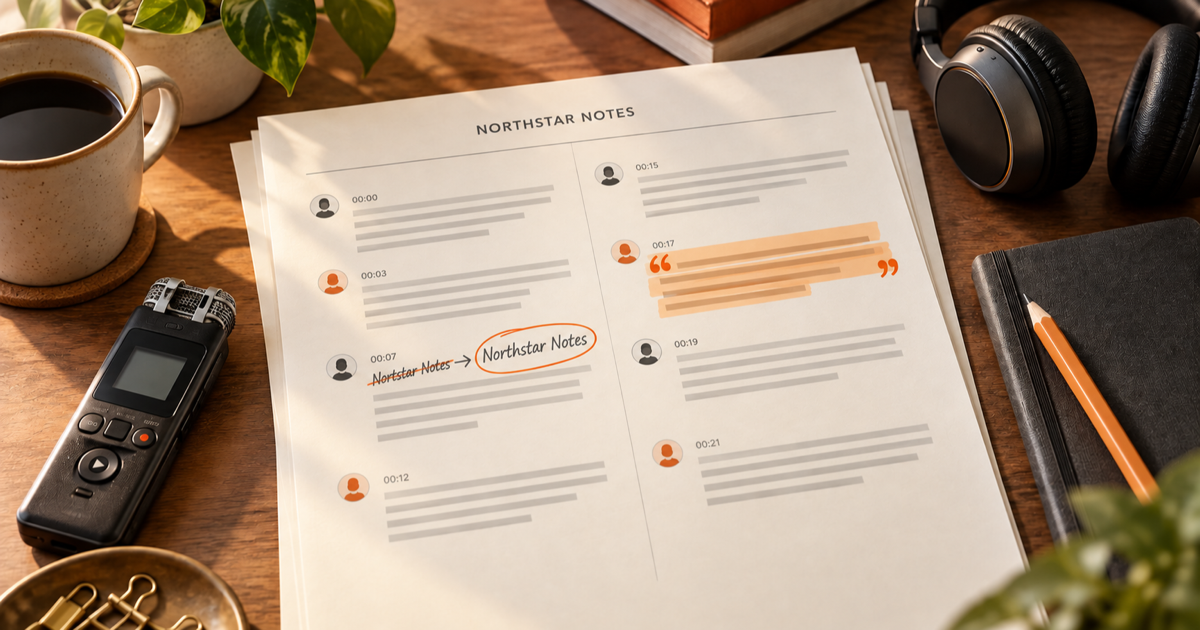
Sample interview: two scripted voices discuss a product name and a publishable quote. The illustrated draft misspells Northstar; replay the relevant turn, correct it to Northstar Notes, and keep its speaker and timestamp with the export.
Name check · 00:03
First draft: Nortstar Notes
After replay: Northstar Notes
Maya · interviewer: When did you first call the project Northstar Notes?
Jordan · guest: At the April field session. We wrote Northstar Notes on the cover.
Maya · interviewer: Can I quote you saying, 'A good note should lead us back to the voice'?
Jordan · guest: Yes. Please use that exact line, and check the name before you publish.
Maya · interviewer: Northstar Notes, two words. I will replay this turn and mark the correction.
How it works
Three steps from source to result
- 01
Upload the interview
Record with your phone or field recorder first, then choose a local MP3, 16-bit PCM WAV at 44.1 or 48 kHz, or Ogg audio file. The page checks it and shows its duration and minute estimate.
- 02
Choose language and speakers
Leave language detection on auto or choose the spoken language. Request speaker labels when you need them; the service returns labels only when the task actually has speaker turns.
- 03
Check and download
Search a phrase, jump to its timestamp, correct names or wording, rename speakers, save, then export the saved version as DOCX or TXT.
01 · Decision guide
Interview transcription for quote review
A quotation is useful only when you can find its source again. Search the draft for a phrase, open its timed turn, and listen to the recording before treating the words as a direct quote.
The on-page result is a working record, not a finished editorial judgment. Short interjections and overlapping voices can be assigned imperfectly, so check the moments that affect attribution.
- Replay names, dates and consequential words.
- Keep a timestamp beside each quote you plan to use.
- Read adjacent turns before cutting a sentence out of context.
02 · Decision guide
Label each speaker
Optional speaker identification asks the existing transcription service for voice turns. If the result has no speaker data, the page says so; it does not invent identities.
The service begins with neutral labels. Rename one label after listening, and that change follows every matching turn and the saved export. A label is a review aid, not proof of a person's identity.
03 · Decision guide
Verify names and quotations
Use the sample to practice the difference between a plausible draft and a checked quote: the proper name needs a human correction even when the rest of the sentence reads smoothly.
Edits to an interview turn and its speaker name are saved with the task. The DOCX includes the corrected text, label and time so the downloaded artifact matches the version you reviewed here.
Limits to check before you start
A useful tool explains the boundary of the result as clearly as the benefit.
- 01This page takes already-recorded local MP3, 16-bit PCM WAV at 44.1 or 48 kHz (mono or stereo), or Ogg Opus/Vorbis audio. It does not record in the browser or accept video and website links.
- 02Each file may be up to 1 GiB and 60 minutes. A signed-in account needs enough minute credits; the current server balance is checked before a task starts.
- 03Processing uses a cloud service. Your task and transcript require your account; the processor receives the uploaded audio. Review the privacy policy before uploading sensitive interviews.
- 04Speaker identification and timing depend on the returned audio analysis. Overlap, brief replies, noise, or silence may leave a turn uncertain or unlabeled.
Practical fit
Workflows this page is designed for
Journalist interviews
Find a statement, replay the neighboring answer and verify the spelling of a person or place before publication.
Research conversations
Keep the question and answer sequence readable while checking short responses and overlap against source audio.
Customer discovery
Review a participant's exact words before sharing a quote with a product team.
Commercial comparison
Audio Convert vs manual transcription vs desktop software
Choose Audio Convert when you want a timed draft and quote review in one browser workflow. Manual transcription gives direct control but requires every turn to be written. A desktop tool may suit an offline policy; check its specific features and cost before choosing it.
Swipe to compare all 3 products →
| Decision | Audio Convert | Manual transcription | Desktop software |
|---|---|---|---|
| Starting point | Local interview audio uploaded in the browser | Audio player and your own text editor | Local audio opened in installed software |
| First draft | Cloud-generated timed turns, with optional speaker labels | Every word and label typed by you | Depends on the software and its settings |
| Quote review | Search, replay, correct and export on the same page | You control each edit and timestamp yourself | Review tools and export formats vary by product |
| When to choose | An editable first draft with a clear path back to audio | Maximum hands-on control without automated transcription | An installed or offline workflow when policy requires it |
Common questions
Answers before you continue
Can I record an interview on this page?
No. Record with a phone, recorder or another app first, then upload a local MP3, 16-bit PCM WAV at 44.1 or 48 kHz, or Ogg audio file.
What happens if two people speak at once?
Overlapping turns can be imperfect or unlabeled. Replay the timestamp and check both voices before you attribute a quote.
Can I change Speaker 1 to a name everywhere?
Yes. Rename the detected label once, save it, and the matching turns and DOCX use that name. Listen first; the tool does not verify a person's identity.
Will DOCX include my name and quote corrections?
Yes. Save the reviewed turn edits before downloading. The DOCX contains those saved words, speaker labels and timestamps.
How are interview minutes charged?
A recording up to 30 seconds uses 0.5 minute credits; longer recordings use rounded-up whole minutes. The page shows an estimate and the server checks your current balance.
Evidence
Sources
Research & verification · Last reviewed
The original two-voice sample was scripted and encoded locally for this page. Input limits, saved speaker labels, private task access, and DOCX output were checked against the implementation and focused tests.
Ready when you are