
A recording, made searchable
M4A to Text
M4A to text starts with the recording you already have. Choose an audio-only M4A file, set the spoken language and speaker option, then review and download the transcript on this page. AAC uploads directly; ALAC is prepared in your browser before upload.
- AAC and ALAC M4A intake
- Language and speaker controls
- Edit, save, and export here
Audio Convert · M4A workspace
Your M4A, a usable transcript
Illustrative sample
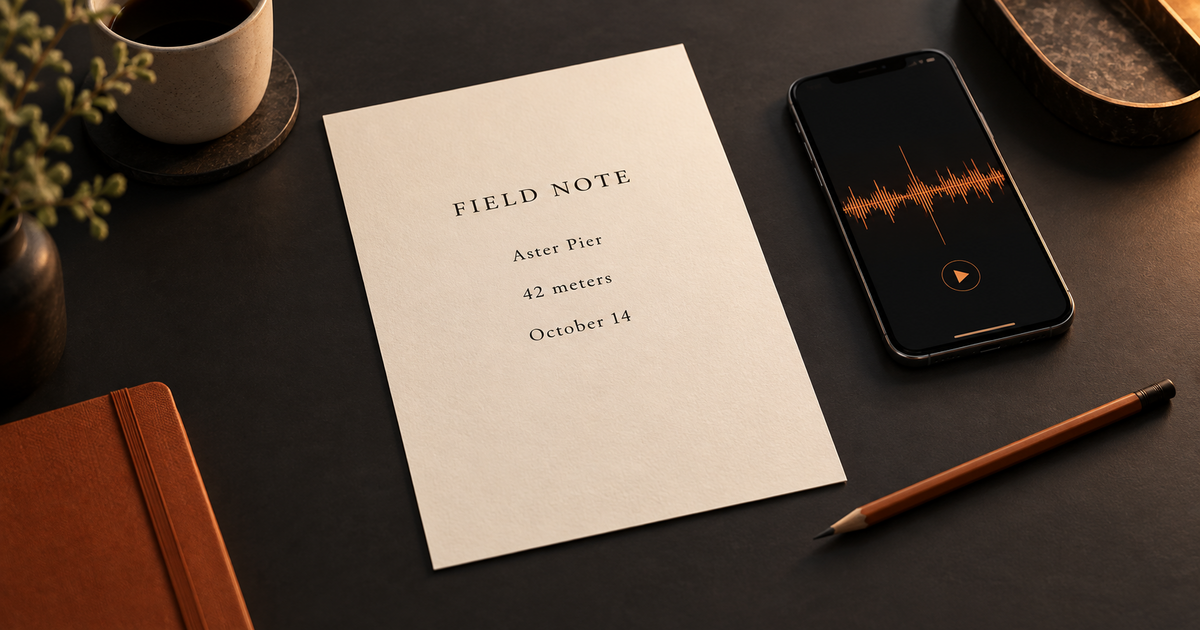
A field note with details worth checking
Suppose a phone recording mentions a place, a measurement, and a date. The example shows how to review those details in the editable transcript before exporting it.
Sample spoken note
“At Aster Pier, the marker is 42 meters from the gate. Check it again on October 14.”
Sample edited text
At Aster Pier, the marker is 42 meters from the gate. Check it again on October 14.
Replay the source audio to confirm names, numbers, and dates in your own result.
Original English sample; spoken words are preserved.
How it works
Three steps from source to result
- 01
Choose your M4A
Select an audio-only recording from Files or your computer. The page checks its container, codec, and duration before upload.
- 02
Set the spoken language
Use automatic detection or choose a known language. Turn on speaker labels if the recording contains a conversation.
- 03
Correct and download
Wait for the draft, check names and numbers against the audio, save your edits, and export a format that fits your next task.
01 · Decision guide
M4A to text from a recording
A saved M4A voice note is a file, not yet an editable transcript. Upload it here to create a draft you can correct while the uploaded audio and text stay attached to one private task.
For a field note, check exact names, amounts, and dates before sharing. The editor keeps your revisions with the task, and each new file starts a separate result.
- Input: a local, audio-only .m4a recording.
- Output: editable text with TXT and DOCX downloads.
- Review: proper nouns, numbers, and speaker changes against the source audio.
02 · Decision guide
AAC and ALAC compatibility
M4A names the container, while AAC or Apple Lossless (ALAC) describes the audio inside. This page inspects the audio track instead of trusting the filename alone. AAC files can be uploaded as recorded; ALAC files are prepared as an MP3 copy in your browser before transcription.
An encrypted track, a different codec, or a damaged container is rejected before upload. A file that cannot be decoded or contains no clear speech may fail during processing. Renaming an extension does not change the encoded audio.
03 · Decision guide
Upload from your phone
On iPhone, export a recording from Voice Memos to Files, then use the file picker above. Apple describes the rendered sharing option as a single M4A file; the picker also accepts a recording already saved in Files.
If sign-in or checkout reloads this page and the selected File cannot be restored, choose the M4A again. Your saved records remain available.
Limits to check before you start
A useful tool explains the boundary of the result as clearly as the benefit.
- 01A signed-in account with available transcription minutes is required to process a recording; see pricing for current plans.
- 02The current upload limit is 1 GiB and 60 minutes per file. ALAC preparation needs enough browser memory and time.
- 03Audio is uploaded for cloud transcription and saved in your private task; it is not an entirely local transcription flow.
- 04Unsupported codecs, encrypted or damaged containers, and silent or unreadable audio cannot produce a transcript.
Practical fit
Workflows this page is designed for
Field observations
Turn a spoken site note into text, then verify a location name, measurements, and a follow-up date.
Interview excerpts
Separate turns with speaker labels, then correct names and figures before quoting.
Study notes
Search a recorded explanation and export the corrected wording for your own notes.
Commercial comparison
Audio Convert vs manual typing vs local transcription
Choose Audio Convert when you want a draft and an editor in one browser flow. Type manually when direct human control matters more than time. Choose local software when keeping the recording on your device is a requirement and you can manage its format and export options.
Swipe to compare all 3 products →
| Decision | Audio Convert | Manual typing | Local transcription |
|---|---|---|---|
| Start with an M4A | Upload AAC or prepare ALAC here | Play and type the recording yourself | Import the file into installed software, subject to its format support |
| Review workflow | Edit and export in the same page; record stays in My Recordings | You control every word, but must build the document yourself | Editing and export depend on the application you choose |
| Trade-off | Uses account minutes and cloud processing | Needs your time, without a transcription charge | Can keep files on your device, but requires compatible software |
Comparison statements reflect the linked public product pages accessed during research. Plans and capabilities can change.
Common questions
Answers before you continue
Can I upload any file ending in .m4a?
No. This page checks for an audio-only M4A container with AAC or ALAC. A renamed file, an encrypted track, or a damaged container may fail even if its name ends in .m4a.
What happens to an ALAC recording?
The page prepares an MP3 copy in your browser and uploads that copy for transcription. Your original ALAC file on the device is not overwritten.
Can I choose a Voice Memos file on my phone?
Yes. Export a rendered M4A recording to Files, then choose it with the file picker. You may also select an M4A already stored on your phone.
Why must I choose the file again after signing in?
A return trip can lose access to the File you selected. If the page asks you to reselect it, choose the M4A again; your saved records remain available separately.
How are minutes and privacy handled?
Transcription uses the minutes available in your current plan. The recording is uploaded for cloud processing, and your task and transcript are available to your signed-in account.
Evidence
Sources
Research & verification · Last reviewed
Format guidance follows Apple's M4A and Voice Memos documentation. The page checks container structure, audio codec, duration, and upload limits before submission.
Ready when you are